Without Bitlync, product compares fields across vendor docs, engineering maintains another vendor library, someone writes and updates the help docs, and each tool adds a vendor relationship.
One model
One model for the stack
Write to one model instead of planning a project per tool. We normalize to Bitlync words, and the MSP still sees the names they already use.
No vendor program
No vendor program per tool
No need to apply to each vendor, wait on their sandbox or sit in their approval queue just to ship.
Around the integration
More than an API call.
An integration is more than the call. Someone has to check the connection, let each MSP set it up, map companies and keep it healthy. Bitlync handles that work for you. Not just billing and ticketing, the whole thing.
1Guided setupInstructions beside each field
2Connection checkKeys and permissions tested before go-live
3MSP configurationEach MSP turns on what fits
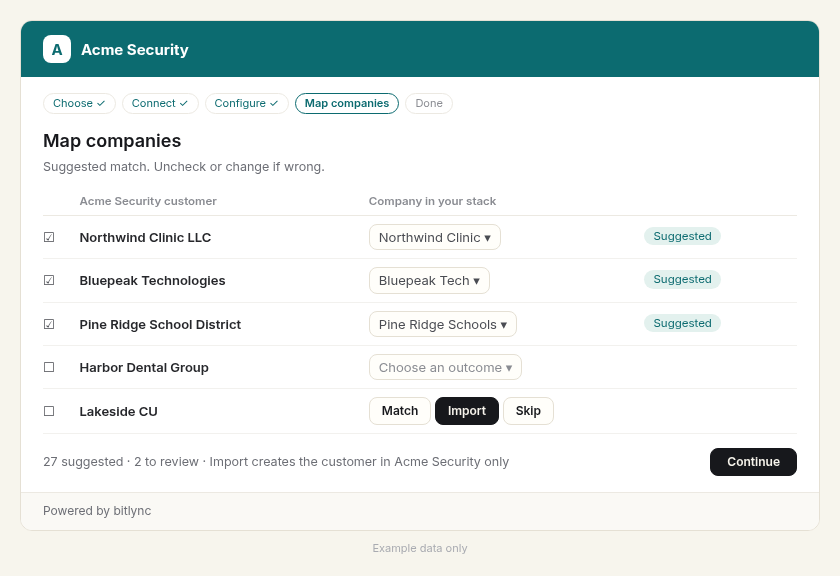
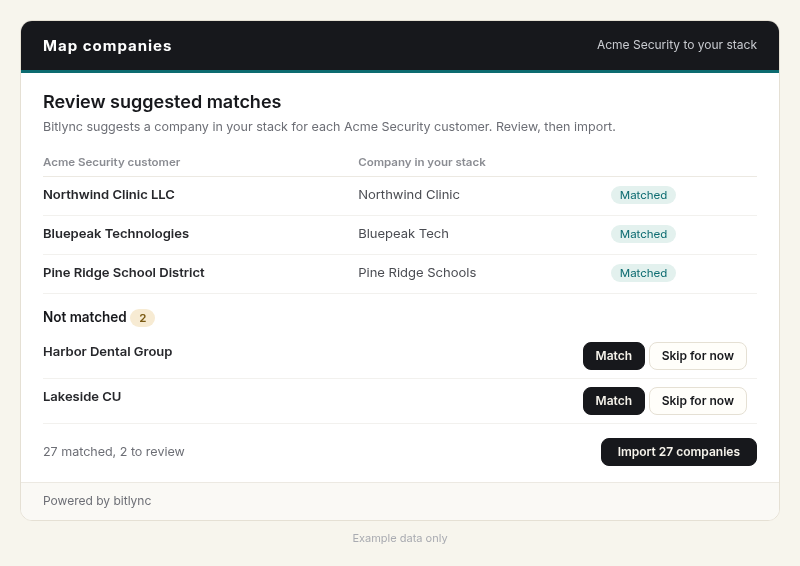
4Company mappingExact and close names matched, the rest for review
5Health over timeIntegration health alerts when something breaks
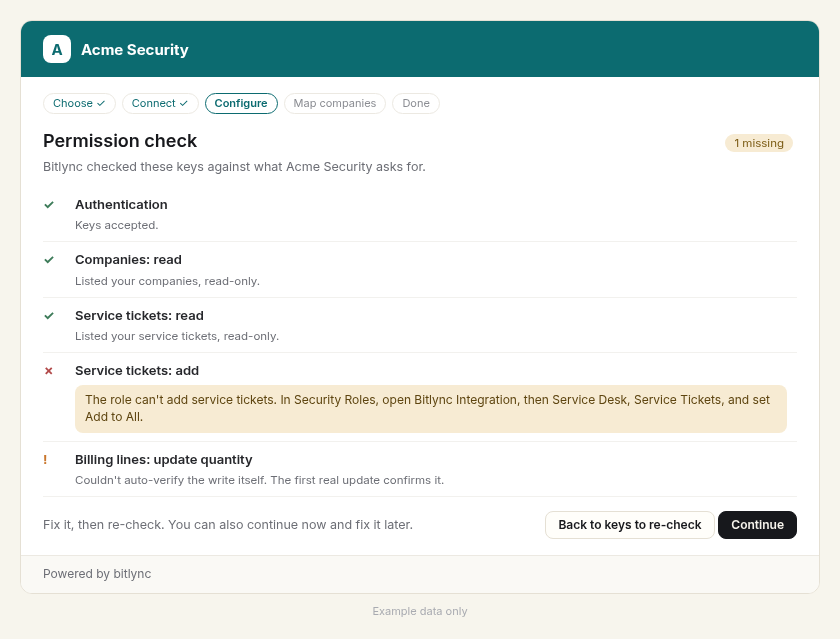
AAcme SecurityCheck
Permission check · Halo
Read ticketsGranted
Create ticketsGranted
Agreement linesMissing
Named before the connection goes live.
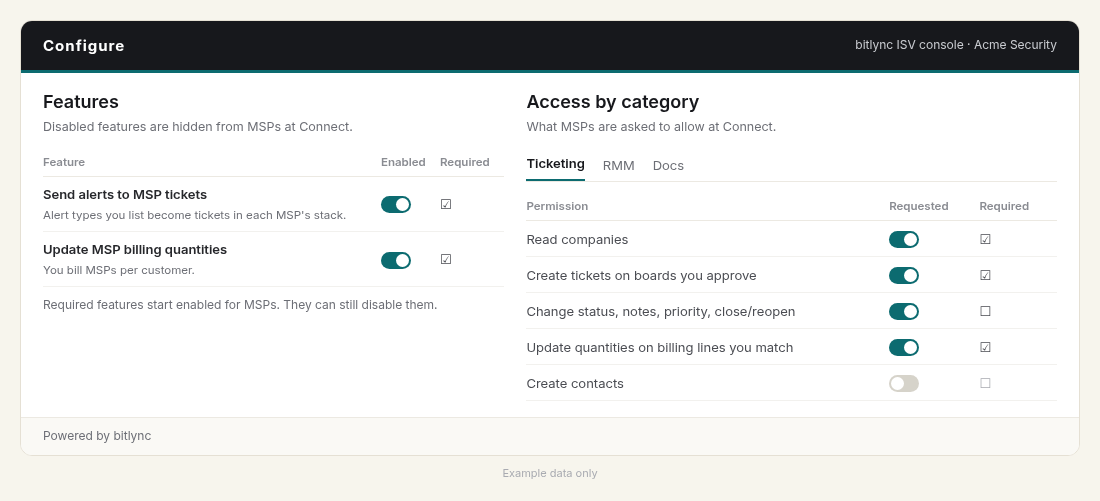
AAcme SecurityConfigure
Features
Send alerts to MSP tickets
Update MSP billing quantities
Disabled features are hidden from MSPs at Connect.
Example data
AAcme SecurityMapping
Auto-matched 2 · review the rest
Northwind ClinicExact name
Cedar Health GroupClose name
Test CoPossible test
AAcme SecurityHealth
Connections
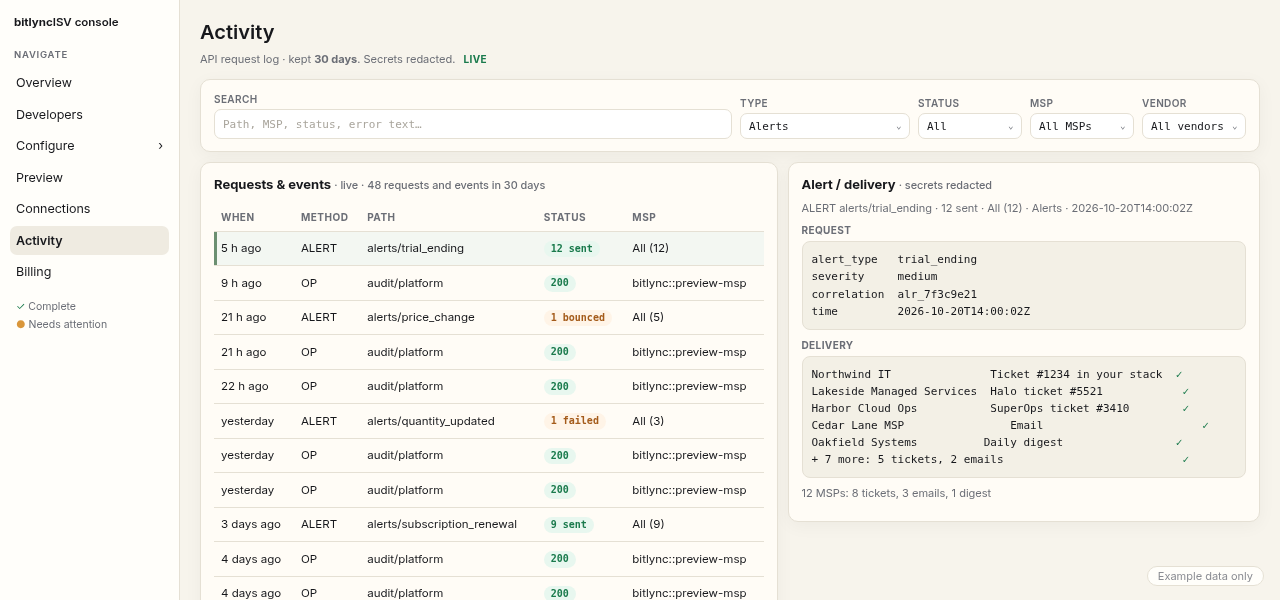
Blue Spruce ITConnectWise · synced 3 min agoHealthy
Cedar Ridge TechnologySuperOps · synced 18 min agoMissing permission
Example data
Connection and permission checksKeys tested and missing permissions named before go-live.
MSP configurationFeature toggles and settings each MSP sets in the flow.
Company mappingAuto-matches clear names and leaves the rest for review.
Billing quantitiesQuantities update automatically in the MSP’s PSA.
Alerts and ticketingYour alert types routed to a ticket, email or digest.
CommunicationDaily and monthly digests, routing and subscription renewal alerts.
Ticket deflectionGuided setup, permission checks and integration health.
Your brandThe flow and portal carry your name, colors and theme.
MSP-managed
The MSP stays in control
The MSP manages each connection and can revoke it anytime.
Your product only
Import where you want it
Import creates the customer in your product only. A small “Powered by bitlync” footer sits on each step.
Write against one shape. Caching, rate limits and retries come with the connection.
sandbox
GET /tenants/{msp}/tickets
200 OK
{
  "served_from": "store",            // read from the synced store
  "last_synced_at": "2026-07-11T14:03:22Z",
  "data": [{
    "id": "tkt_8f31",
    "source": "superops",
    "status": "in_progress",         // normalized across tools
    "summary": "VPN keeps dropping",
    "raw": { ... }                    // the vendor’s original payload
  }]
}
POST /tenants/{msp}/tickets
403missing_permission
The MSP has not granted Service Desk for this connection.
Pain today
Without Bitlync, each vendor has its own auth, limits, retries and error pages, and MCP pointed at the vendor spends the shared rate budget on each call.
The sandbox
First call the same day
Seeded tenants and API docs, so you can make your first call the same day.
The shape
Three tools, one normalized read
Reads and writes use one model. REST and MCP use the same service.
The store
One rate limit you can see
Reads come from our synced store, not the vendor each time. We pace calls, retry transient failures and return one result or tell you to wait. A retry does not create a second ticket.
MSP-managed
Connections the MSP controls
The MSP connects their own tools and can manage or revoke each connection, so there is nothing to handle in your app.
The preview
Readable refusals
Writes are real by default, so test them in the sandbox. If we refuse a write, you get a stable code and a sentence you can read.
Support can see last sync, permissions and the activity log, so a missing permission does not need a developer.
AAcme SecurityConnectionsExample data
CustomerToolStatusLast sync
Blue Spruce ITConnectWiseHealthy3 min agoActivity log →
Harbor Managed ServicesHaloHealthy6 min agoActivity log →
Cedar Ridge TechnologySuperOpsMissing permission18 min agoActivity log →
Permission check
Read ticketsGranted
Read companiesGranted
Service DeskMissing
Activity log
Read tickets from the store
Write refused: missing Service Desk
Named in the row, waiting on the MSP
Pain today
Permission problems become tickets.
Without Bitlync, a missing permission arrives as a support ticket. Support cannot see last sync or the log, and a developer has to read the vendor error.
Connections
Health for each connection
Last sync and status for each MSP connection, with the missing permission named in the row.
The log
What happened, and when
Each read, write and refusal is in the activity log with a time, so support can tell the MSP exactly what to add.
Billing that stays current and vendor alerts routed your way, in a stack you control.
Send toautosaved ✓
Critical alertTicket
Subscription renewalEmail
Low and info alertsMonthly digest
Monthly digest · OctoberAcme Security
Product alertAcme Endpoint critical update
Trial endingHarbor Clinic, Oct 28
RenewalNorthwind Logistics, Nov 15
Price changeAcme Mail Defense $3.00 to $3.50
Example data
BillingAcme Security
Customer
Count
Next update
Northwind Logistics
48 devices
Oct 20
Harbor Clinic
123 users
Oct 20
No babysittingBilling
Simplify billing reconciliation
Match each vendor service once, and quantities update automatically in your PSA.
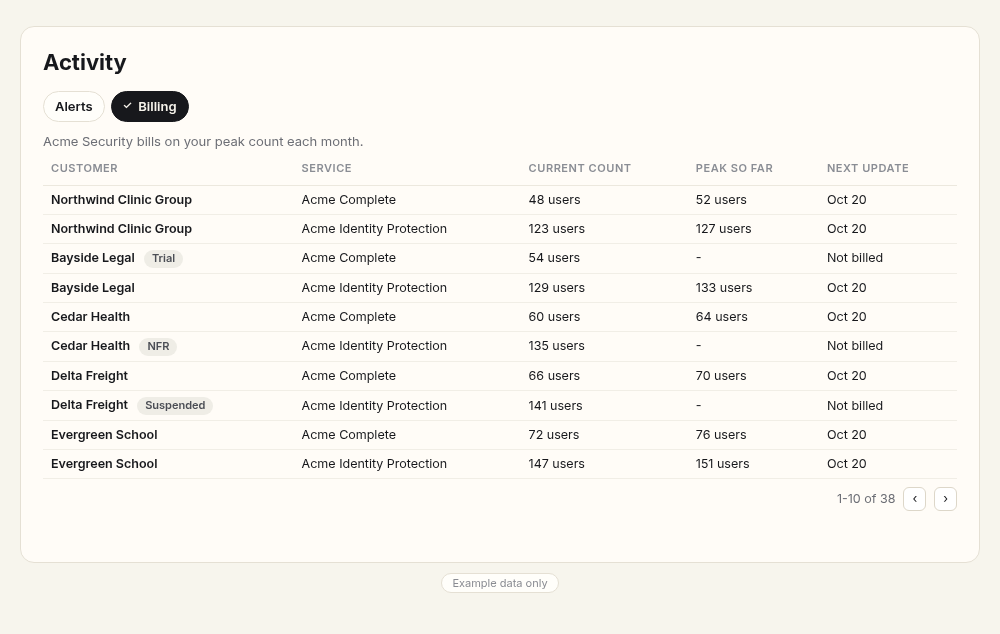
Activity · BillingYour stack
Acme Security bills on your peak count each month.
Customer
Service
Current
Peak so far
Next update
Northwind Logistics
Acme Endpoint
4848devices
5252devices
Oct 20
Northwind Logistics
Acme Identity
123123users
127127users
Oct 20
Harbor Clinic Trial
Acme Endpoint
5454devices
-
Not billed
Bluepeak Tech
Acme Endpoint
6060devices
6464devices
Oct 20
Pine Ridge Schools
Acme Identity
135135users
141141users
Oct 20
Example data only.
ControlAlerts and tickets
You decide where vendor messages go.
A critical alert can open a ticket, a billing or subscription notice can go to email, the rest can wait for your monthly digest, or any mix you want. Renewal and trial notices go where you route them.
Send Acme Security alerts to your stackSaved ✓
AlertSeveritySend to
Critical product alertCriticalTicket
Subscription renewalLowEmail
Policy updatedInfoMonthly digest
Trial ending 7 days beforeMediumTicketEmail
Tickets go to · ConnectWise
BoardAlerts
TypeVendor alert
SubtypeNone
✓ Saved
Send to options: Ticket · Email · Daily digest · Monthly digest · Off
ControlVaultActivity
See and control what each vendor can reach.
See which vendor can reach what in your stack and revoke a vendor's access. Actions, alerts and changes are logged in Activity.
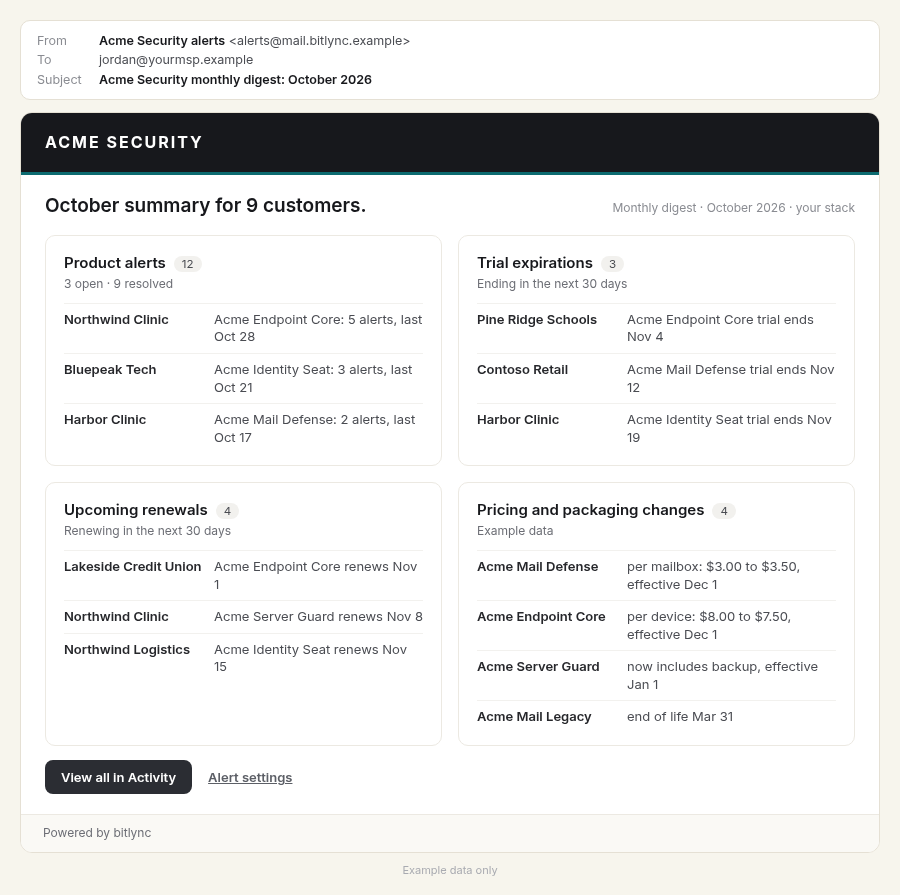
Proof of valueMonthly digest
See what each vendor did for you this month.
One monthly email with product alerts, trial expirations, upcoming renewals and pricing and packaging changes for your customers.
Save time
Your customers, matched and imported for you.
Bitlync matches the vendor's customers to the companies in your stack, so you review a list instead of mapping by hand.
More in the box
The details, taken care of.
Send a test ticket. Close it from Bitlync.
Creates a low-priority “[Bitlync test]” ticket where you routed it, so you can check it before real alerts arrive.
Tickets go to
Board: Alerts · Type: Vendor alert
Created #1234 ✓ · Priority: Low
[Bitlync test] ticket
Close test ticket
Vendor info on each company record.
A vendor can write a field, like a contract link, onto each company in your stack, and Bitlync adds the field if it isn't there yet.
CompanyYour stack
Northwind Logistics
Contract Link
https://acme.example/contracts/NW-1042
Added by Acme Security via Bitlync
Example data only
Branded as your vendor.
The Connect flow, tickets and emails carry your vendor's brand, with a “Powered by bitlync” footer.
The screens your MSPs see use your logo, colors and theme. Check the preview, then save and publish.
Connect
One Connect flow.
Your MSPs connect their stack in a few steps, with instructions showing exactly where to find each value. You don't build or maintain setup docs for those integrations.
Least privilege
Permissions checked before they connect.
Bitlync checks the MSP's keys against the permissions you require before they can finish connecting. If something is missing, it shows exactly where to fix it in their stack, so setup mistakes don't become tickets for your support team.
Ask only for what you need. Riskier writes start off, and Bitlync refuses deletes.
Step-by-step instructions show MSPs where to set the right permissions.
If a permission is lost later, the MSP gets a connection problem alert.
Configuration
MSPs see what you'll use before they connect.
Turn features on, mark what's required, and request permissions by category. Disabled features are hidden from MSPs at Connect.
Alerts
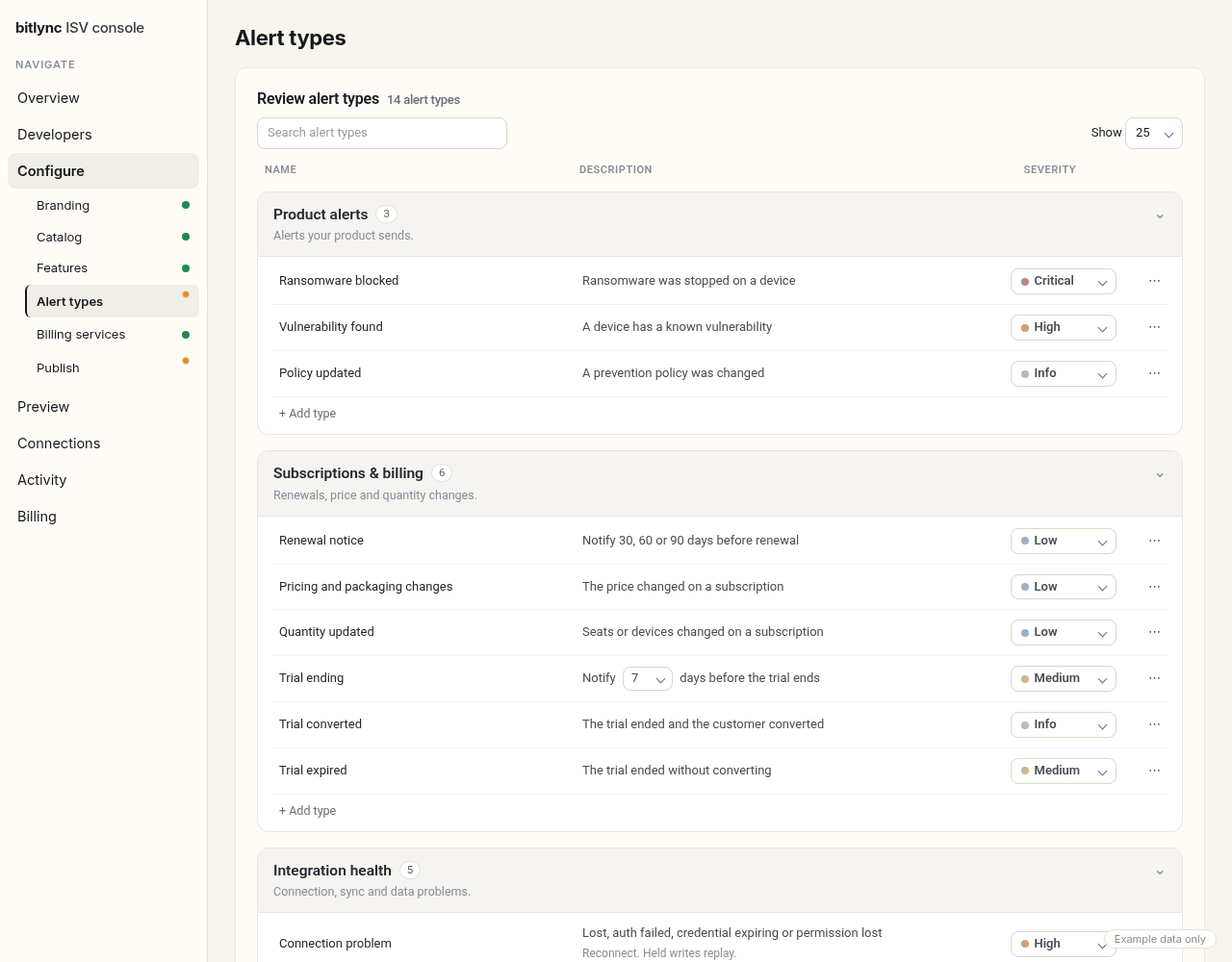
Alerts your MSPs act on.
Define your own alert types with severities and defaults. Each MSP routes them to a ticket, email or digest in their stack.
Product alerts: the alerts your product sends.
Renewal notice, 30, 60 or 90 days before renewal.
Pricing and packaging changes.
Integration health: connection, sync and data problems.
Billing
Billing quantities that stay current.
Quantities update automatically in the MSP's PSA on the agreements they matched. Your MSPs use those quantities to keep customer agreements current, so they bill customers for what they actually use.
Customer matching
Customers matched for you.
Bitlync suggests matches between your customers and the MSP's companies, so onboarding takes less of your team's time. MSPs can also import companies that aren't matched yet as new customers in your product.
Health and activity
Know when a connection breaks.
Integration health and an activity log show you and the MSP what happened and when.
More in the box
The details, handled.
Send a test ticket.
The MSP sends a low-priority test ticket from setup, then closes it from Bitlync.
Tickets go toYour stack
Board: Alerts · Type: Vendor alert
Created #1234 ✓ · Priority: Low
[Bitlync test] Acme Security: no action required, safe to close
Close test ticket
Example data
A monthly digest for each MSP.
One email a month with your alerts, trials and renewals for their customers.
Monthly digest · OctoberAcme Security
Product alertAcme Endpoint update
Trial endingHarbor Clinic, Oct 28
RenewalNorthwind Logistics, Nov 15
Example data
Integration changes, flagged.
When you add, remove or change a service, each MSP gets an integration changes alert.
Bitlync is in stealth. We’re taking a small number of paid design partners ahead of general availability.
Paid design partners get direct engineering access, roadmap input, and founding pricing locked for the term.
Bitlync, Inc. is a Delaware corporation.
Overview
Start here.
Hold a key. Call a seeded tenant. Then the MSP pastes their own keys.
You sell software to MSPs (managed service providers). They run IT for other companies, on a stack they already chose. Winning those deals is much harder if you cannot connect to that stack.
PSA — their business system. Customers, tickets, service desk, projects, invoices, agreements.
RMM — their device system. Inventory, monitoring, patching, access.
Documentation — the detailed record. Passwords, networks, and what happened at that customer, linked to the PSA company and the RMM assets.
Commerce — where they buy licenses (direct or through a distributor) and then bill the customer.
Those tools do not share one API. Every MSP picked a different mix. Bitlync is one API with one shape. You write once. The MSP pastes their own keys. You do not hold them.
The MSP pastes keys. You never hold them. REST and MCP use the same model.
How it behaves — cache, rate limits, retries, vault, routing — lives in Concepts.
Concepts
How the API behaves.
Store reads, pacing, writes, vault, and errors.
Store-served reads
Reads come from the synced store for that MSP tenant. One sync fills the store. Every ISV on that tenant reads the same copy.
Mechanism
The caller asks for tickets, devices, or other listed reads. Bitlync answers from the store. That path does not spend vendor budget. live=True is an opt-in live read when a store read is not enough.
What the caller sees
The response names the store and the last sync. Fields are served_from and last_synced_at.
Every canonical object includes vendor: { connector, native_id, native }. native is the same payload as .raw. .raw is read-only.
Rate limits
We pace writes to the vendor’s real limit. If we have to wait, you get a rate-limit response (HTTP 429) with Retry-After. You do not guess a vendor quota.
One sync per MSP tenant fills the store. Every product on that tenant reads the same copy. When each product polls the same PSA, they share one budget.
Today — every product polls
With Bitlync — one governed sync
Mechanism
ISV-facing: 600 req/min times the number of connected MSPs. There is no daily cap. The per-minute rate is the limit. Hit it and you get a rate-limit response with Retry-After. There is no silent throttle.
What the caller sees
A rate-limit response you can branch on. The header is the wait. Do not treat a delayed 200 as a throttle.
Rate limit (429) + wait
HTTP 429
Retry-After: 12

{
  "status": 429
}
No silent queue that looks like success.
Delivery
Transient vendor rate limits (429) and 503 are retried with backoff on the Bitlync side of the write.
Mechanism
The caller sends one write. Bitlync retries the vendor when the failure is transient. The caller is not asked to implement vendor backoff for those hops.
What the caller sees
The caller sees one result. If the write still cannot land, the final rate-limit response (429) still carries the vendor Retry-After.
Final rate limit still honest
HTTP 429
Retry-After: 30

{
  "status": 429
}
No hidden swallow of a vendor rate limit (429). No rewrite of a final rate limit into a 200.
Delivery status is visible. Nothing is dropped silently.
Mechanism
A write that was acknowledged cannot double-write. A write that was throttled is a real rate-limit response (429), not a delayed success. Dedup and retries sit on this same rule.
What the caller sees
Success means the write landed or was an idempotent replay. Throttle means a rate-limit response (429) plus Retry-After.
acknowledged, not doubled
{
  "idempotent_replay": false
}
No silent drop. No “accepted” that later vanishes.
Writes that support it take idempotency_key. The same key does not open a second ticket.
Mechanism
Send the key on the write. A retry with that key is a replay, not a new vendor create.
Keys are not implied on every future write. Only writes that already support idempotency_key.
Ticket, device, and company events: list with GET /tenants/{id}/connections/events or a signed webhook. Grants psa.ticket.events, rmm.device.events, psa.company.events. Missing is grant_missing.
Writes
dry_run defaults to false, so a write is real. Test writes in the sandbox. Optional: dry_run true checks a write against a new MSP's setup without creating a record. After Bitlync creates a ticket, you can update it, append a note, close with evidence, or POST hours on that ticket only. You can close a ticket once they accept the connection. Auto-close when a finding is fixed is a separate switch. Closing is the MSP's call. On Configure, under Ticketing, the MSP turns on "Allow closing tickets with a resolution" for that connection; it is off by default. On, a close_with_resolution write closes the ticket in your stack with the resolution note. Off, the resolution lands as a note and the ticket stays open. Ticket create and update on ConnectWise and Halo accept board, status, and priority ids from GET /tenants/{id}/ticket-boards, ticket-statuses, and ticket-priorities; unknown id returns 422. Hours take stated billable and a member id from the PSA list. ConnectWise and Halo list members for the time picker. No notes on time. Not field-level ticket sync.
Mechanism
Writes are real by default. Send an idempotency_key on writes that support it; dry_run true checks first without creating a record. If a fan-out is only partial, that failure is explicit. It is never collapsed into a single silent success.
What the caller sees
A dry run does not create a ticket. A commit does. Partial failure is visible on the response, not hidden.
write, or check first
{
  "summary": "Printer offline",
  "idempotency_key": "ticket-1"
}

// optional check, no record created
{
  "summary": "Printer offline",
  "dry_run": true,
  "idempotency_key": "ticket-check-1"
}
Halo, ConnectWise, and SuperOps ticket create, update, close, reopen, and notes commit when dry_run is false. ConnectWise and Halo time entries commit when dry_run is false. Halo pulls agreements and line items, the same objects as ConnectWise. ConnectWise and Halo update the quantity on a line item the MSP matched on an existing agreement. We never create agreements or line items. SuperOps reads companies, tickets, and agreements. Billing quantity updates are not available for SuperOps. ConnectWise and Halo pull the project container and write on an existing project. We do not mint a project header. Some connectors cannot take that write. ConnectWise and Halo list ticket statuses, boards, and priorities live and enrich ticket display; ticket create and update accept those list ids (unknown id returns 422). ConnectWise and Halo list members for the time picker. When company import from PSA is available, Import creates a leftover in the ISV after preview (bulk Import unmatched uses the same path). When that write is unavailable, Import returns 501. We never create the company in the PSA. Pax8 matches a company it already has, then creates the rest.
The MSP can approve or dismiss a mapped line item. Approve updates the quantity on the matched line of an existing agreement. Dismiss does not change the agreement. ConnectWise and Halo.
The payload is checked against that vendor’s rules before it leaves Bitlync.
Mechanism
A bad field fails on the request you sent. It does not create a ticket.
What the caller sees
HTTP 422. Branch on stable codevalidation.
422 on your request
HTTP 422

{
  "code": "validation",
  "message": "The request did not validate.",
  "doc_url": "https://docs.bitlync.com/concepts/errors/"
}
No “send it anyway and let the PSA reject it.”
Credential vault
The MSP pastes their own keys. Those keys sit in a per-tenant vault. The ISV never holds them. We stamp when keys land. No connect, no keys.
Mechanism
ISVs start with a key that looks like blk_… and header X-API-Key. MSP credentials are entered on Bitlync, not in your frontend.
What the caller sees
Your product sends X-API-Key. It does not send the MSP’s PSA or RMM secret.
ISV auth header
X-API-Key: blk_…

# MSP keys are not in this header.
# They sit in the per-tenant vault.
The ISV does not paste MSP creds. There is no shared-secret path that puts PSA keys in your app.
Exact-name auto-Match fills Match when a leftover PSA company name uniquely matches an existing ISV customer — Match only, never auto-import. A leftover ask is Match, company import from PSA, Skip, or Needs match. Bulk unmatched import is available with dry_run preview. Ambiguous UNMAPPED is a human match. It is never an auto-create or auto-import.
Errors
Branch on the stable code. Do not parse a human sentence.
Mechanism
The codes on this page are the codes that exist: 401 auth, 403 tenant, 404 unknown tenant, 422 validation (and request_invalid on a bad sandbox reset), 429 plus Retry-After, 501 unsupported / parked capability, 500 opaque internal_error.
What the caller sees
The body is code, message, and doc_url. details is optional.
stable code
{
  "code": "validation",
  "message": "The request did not validate.",
  "doc_url": "https://docs.bitlync.com/concepts/errors/"
}
500 stays opaque. A parked write is 501, not a generic 500.
Health, incidents, and audit are listed reads on Reference, not a new UI.
MSP permissions
A missing write permission can still connect as partial. Reads work. The parked write is refused distinctly. That is not a generic 500.
ConnectWise, Halo, and SuperOps connect are numbered click paths in the flow. Halo pastes a client ID, client secret, and the two server URLs. If a permission is missing, we name it in English. We never create companies or agreements in the PSA; the MSP creates them. Company custom-field write (grant psa.company.update) is off by default; on when the MSP enables it. We always match first. If two records match, we refuse.
Mechanism
The MSP pastes keys in the guided flow. The probe names the permission to fix. The ISV does not paste MSP creds.
What the caller sees
Reads still serve from the store. A parked write is 501 unsupported. Portal copy tells the MSP which permission to fix.
parked write, not 500
HTTP 501
{
  "status": 501,
  "code": "unsupported"
}

# Portal copy names the permission.
# ISV does not paste MSP creds.
No ISV-side form that collects PSA keys. Partial connect is not collapsed into “failed.”
Quickstart
From key to first write.
This is the sandbox. Fixture data. Not a customer tenant.
Copy the curl. You should get tickets back with sandbox: true.
Send the key as X-API-Key. Host is bitlync-sandbox-demo.onrender.com.
dry_run defaults to false, so a write is real. Send an idempotency_key; the same key on a retry returns idempotent_replay. Test writes in the sandbox. Optional: dry_run: true checks a write against a new MSP's setup without creating a record.
POST /sandbox/reset with {"tenant_id":"sandbox-mainstreet"}. Clears audit, re-syncs fixtures, writes one sandbox_reset event. Production tenants return 422 request_invalid.
Same CanonicalService as REST. Four tools: list_tickets, list_devices, list_installed_applications, route_finding. route_finding is the write. Use $BITLYNC_BASE.
Use the Bitlync MCP. Tenant sandbox-mainstreet. Send X-API-Key.

Read with list_tickets, list_devices, or list_installed_applications.
The write tool is route_finding. Do not create tickets over MCP.
dry_run ticket create is REST-only.
Replace existing integrations
Replace existing integrations.
You already have vendor clients. Change those calls to Bitlync. We do not ingest your old code or import tokens.
The ISV rewrites the calls. The MSP pastes keys once. Connect names a missing permission in the flow.
.raw is extra vendor fields on a read. It is read-only. vendor.native is the same payload. Ticket writes accept optional vendor_native.
Order: inventory, coverage, reads, writes. Webhooks only if we already have them. Reads first. Keep the old vendor clients until Bitlync matches in their environment. dry_run is the shadow pass on writes.
Never: mint an agreement header; auto-create an unmatched company.
Tickets are two-way when the MSP grants it. You can create, update, and close. You can subscribe to events when the MSP changes the ticket in their PSA. Grants: psa.ticket.create, psa.ticket.update, psa.ticket.events. Ticket, device, and company events: list with GET /tenants/{id}/connections/events or a signed webhook. Grants psa.ticket.events, rmm.device.events, psa.company.events. Missing is grant_missing. You can close a ticket once they accept the connection. Auto-close when a finding is fixed is a separate switch. Line items: quantity updates only, on lines the MSP matched on an existing agreement. Ending a line is refused. To stop billing, send quantity 0. Public word Agreement. Time: hours the caller states, on a linked ticket. We never create companies or agreements in the PSA; the MSP creates them. Company custom-field write ships with grant psa.company.update off by default; on when the MSP enables it. We always match first. If two records match, we refuse. A company create at a distributor, when that write exists and the MSP granted it, is not a PSA create.
Auth is the X-API-Key header. Writes take dry_run (default false; writes are real). Import the OpenAPI file. This page is not the spec.
OpenAPI 0.90.0 is the file on this site. The running spec is 0.94.0.
GET /tenants/{tenant_id}/tickets
POST /tenants/{tenant_id}/tickets
Tickets
List and create. Create and update accept board, status, and priority list ids on ConnectWise and Halo. Write back (update, note, close-with-evidence, hours) only on tickets Bitlync created. You can close a ticket once they accept the connection. Hours are a write, not a read. Writes are real by default.
Store-served. 501 when the connector does not support agreements. We do not mint a header.
POST
/tenants/{tenant_id}/billing/quantities
Absolute quantities on lines the MSP matched. Quantity 0 stops billing. Ending a line is refused. A change over the MSP's threshold (default 25%, or off) waits for the MSP.
GET
/tenants/{tenant_id}/devices
Store-served device list.
GET
/tenants/{tenant_id}/applications
GET
/tenants/{tenant_id}/audit
GET
/tenants/{tenant_id}/connections
GET
/tenants/{tenant_id}/connections/events
GET
/tenants/{tenant_id}/identity/mappings
GET
/tenants/{tenant_id}/identity/unmapped
GET
/tenants/{tenant_id}/incidents
GET
/tenants/{tenant_id}/status
GET / PUT
/tenants/{tenant_id}/routing
POST
/tenants/{tenant_id}/companies
POST
/tenants/{tenant_id}/companies/write
Company custom-field write via vendor_native. Grant psa.company.update off by default.
POST
/tenants/{tenant_id}/findings/route
POST
/sandbox/reset
Sandbox tenants only
Ticket
GET and POST /tenants/{tenant_id}/tickets. Create and write-back accept optional board, status, and priority ids from the ticket-boards / ticket-statuses / ticket-priorities lists on ConnectWise and Halo (unknown id → 422). Write-back and hours only on tickets Bitlync created. Time has no notes field.
Company
POST /tenants/{tenant_id}/companies. Pax8 matches a company it already has, then creates the rest. A company create at a distributor, when that write exists and the MSP granted it, is not a PSA create. PSA company create is not supported: companies are created by the MSP, and a PSA create returns 403 company_create_not_supported. Match to an existing company. When company import from PSA is available, Import creates a leftover in the ISV after preview (bulk Import unmatched uses the same path). When that write is unavailable, Import returns 501. We never create the company in the PSA. Company custom-field write ships on POST /tenants/{tenant_id}/companies/write via vendor_native (ConnectWise customFields, Halo customfields/cf*). Grant psa.company.update is off by default; on when the MSP enables it. Never creates a company.
Device
GET /tenants/{tenant_id}/devices.
Agreement
GET /tenants/{tenant_id}/agreements. Recurring MSP service billing arrangement. Not “PSA Contract.” We do not mint an agreement header.
What we write
What we write.
Quantity on lines the MSP matched on an existing agreement. Locks and refusals.
ConnectWise and Halo: the MSP matches each service to a line item they already have. You send an absolute quantity with POST /tenants/{tenant_id}/billing/quantities. Bitlync updates that line. You do not create the line, and you do not send the match yourself. Ending a line is refused. To stop billing, send quantity 0. How often you send quantities: daily or monthly. The MSP sets the threshold (default 25%, or off) and Advanced review (off by default) on the Billing tab. A change over their threshold, or Advanced review, waits for the MSP to review it first. The same quantity as last time comes back unchanged, and nothing new is written. You cannot bypass that review by writing the agreement line yourself. Writes are real by default. dry_run true returns the same statuses and writes nothing. We never create agreements or line items.
Billing quantity updates are not available for SuperOps. SuperOps reads agreements and does not create, change, or end contracts or billing lines.
You need an active agreement so we can write the line.
Tickets are two-way when the MSP grants it. You can create, update, and close. You can subscribe to events when the MSP changes the ticket in their PSA.
PSA company create is not supported: companies are created by the MSP. A PSA create returns 403 company_create_not_supported with no PSA call. Match to an existing company.
Company custom-field write ships on an existing company via vendor_native (ConnectWise, Halo). On Halo and ConnectWise the field works live. It is created once in your stack under the MSP's standing psa.company.field.create grant, and an existing field with the same label is reused. The field label shows on Configure. Grant psa.company.update is off by default; on when the MSP enables it. Missing grant is grant_missing. Leftover psa_company_update_refused means the grant is on and the connection still refuses the live write. This path never creates a company.
Device write is off unless the MSP turns it on for your grant. We never create a company in the PSA. A missing grant is grant_missing.
If they try anyway: a stable code, one English sentence, and doc_url. details is optional.
agreement_header_not_supported — they tried to mint a header. Bitlync refuses. That is policy.
agreement_requires_existing — missing or unknown agreement.
ConnectWise and Halo write on an existing project. We do not mint a Project header. Some connectors cannot take that write.
project_requires_existing — missing or unknown project.
project_header_not_supported — they tried to mint a Project header. Bitlync still refuses. That is policy.
project_not_writable — Some connectors cannot take that write.
project_company_cannot_update — the project’s company cannot be updated.
Pax8 matches companies it already has, then creates the rest. A company create at a distributor, when that write exists and the MSP granted it, is not a PSA create. PSA company create is not supported; companies are created by the MSP.
company_create_not_supported — a PSA company create; companies are created by the MSP.
company_match_ambiguous — more than one match. We do not create.
distributor_required — no connected distributor for this write.
Use cases
The paths.
The jobs. Alert to ticket through check an asset.
1. Alert to ticket
A finding becomes a ticket we created. We keep the link. You can update, append a note, or close with evidence on that ticket.
2. Two-way tickets
Tickets are two-way when the MSP grants it. You can create, update, and close. You can subscribe to events when the MSP changes the ticket in their PSA. Grants: psa.ticket.create, psa.ticket.update, psa.ticket.events. Ticket, device, and company events: list with GET /tenants/{id}/connections/events or a signed webhook. Grants psa.ticket.events, rmm.device.events, psa.company.events. Missing is grant_missing.
3. Map customers
Map customers to companies that already exist. Exact-name auto-Match fills Match only (never auto-import). A leftover is Match, company import from PSA, Skip, or Needs match.
4. Match a company
Companies are created by the MSP in their PSA. We never let apps create companies there: a PSA create returns 403 company_create_not_supported. Match to the existing company instead.
5. Company custom fields
Write custom fields on an existing PSA company via POST /tenants/{id}/companies/write and vendor_native. Grant psa.company.update is off by default; on when the MSP enables it. ConnectWise and Halo. Never creates a company.
6. Time on the ticket
Hours on a ticket Bitlync already linked. Hours, stated billable, member from GET /tenants/{id}/members on ConnectWise and Halo.
7. Billing reconciliation
Read agreements and lines. The MSP matches your product to an existing line. You send an absolute quantity with POST /tenants/{tenant_id}/billing/quantities. Ending a line is refused. To stop billing, send quantity 0. How often you send quantities: daily or monthly. A change over the MSP's threshold (default 25%, or off), or Advanced review, waits for the MSP. We never create agreements or lines.
8. Create action items
Create the follow-up the MSP already tracks.
9. Create initiatives
Create the workstream those items sit on.
10. Add to an existing project
Add notes or items on a project that already exists.
11. Create an order
Place a third-party licensing order.
12. Write a document
Write into the MSP's documentation tool.
13. Read devices
Pull the device roster.
14. Software inventory
Pull installed software.
15. Check an asset
Pull the documented asset.
If you are this kind of ISV
Alerting/security — map companies, do not create. Tickets create, update, close, and events. Optional agreement lines for billing counts.
Network monitoring — companies must already exist. Two-way tickets. Create-only is not enough.
Backup — failed job to ticket, close when it succeeds. Optional usage on agreement lines.
Documentation — PSA companies are the source of truth. Document write. No company create.
vCIO / QBR — map companies, findings to tickets, add to an existing project.
Commerce / distributor: map, orders, quantity updates on lines the MSP matched on existing agreements.
Quoting — map to the company the MSP created for a new logo.
Time / scheduling — ticket update (status, notes), time write. Hours on a linked ticket, not a full timesheet product.
Identity / comms — full two-way tickets plus time.
Onboarding / import — match first; the MSP creates new companies in the PSA.
AI copilot — read plus ticket write plus events. Do not lead with creating companies or agreements.
SuperOps billing-line writes were removed. Bitlync never creates companies, agreements, or billing lines in an MSP’s PSA. Billing writes only update the quantity on a line the MSP matched on an existing agreement. Ending a line is refused. To stop billing, vendors send quantity 0.
2026-10-12
SuperOps joins the list as one connection that covers both PSA and RMM. Tickets read and write, companies and agreements read, and a company custom field created once in your stack.
MSP Connect is branded as your product, with a background pattern, solid color, or image. Five steps: Choose, Connect, Configure, Map companies, Done. One “Powered by Bitlync” footer on every step.
2026-10-12
SDK 2.0.0 (breaking): the generated Python and TypeScript clients now return typed response models where the spec declares one (for example TicketList) instead of plain dicts. Read attributes (listed.sandbox) or call .to_dict().
OpenAPI 0.90.0. Writes are real by default: dry_run defaults to false. Optional: dry_run true checks a write against a new MSP's setup without creating a record. Test writes in the sandbox.
The MSP can turn on "Allow closing tickets with a resolution" per connection on Configure, under Ticketing. It is off by default. Off, the resolution lands as a note and the ticket stays open.
Halo and ConnectWise company custom fields work live. The field is created once in your stack under the MSP's standing psa.company.field.create grant. The field label shows on Configure.
2026-09-18
OpenAPI 0.79.0. Company custom-field write ships on POST /tenants/{id}/companies/write via vendor_native (ConnectWise customFields, Halo customfields/cf*). Grant psa.company.update is off by default; on when the MSP enables it. Never creates a company. Production badge stays off.
2026-09-11
OpenAPI 0.77.0. Halo ticket inbound supports tickets only with Basic under a path token; polling remains available; the store is unchanged. Production badge stays off.
OpenAPI 0.76.0. Inbound E3a plumbing only (refuse-unknown + DirtyFlagBoard → sync); no vendor parsers; poll stays; mount-when-wired. Production badge stays off.
OpenAPI 0.75.0. Production badge stays off.
OpenAPI 0.74.0. Exact-name auto-Match (never auto-import). Leftover ask is Match / company import from PSA / Skip / Needs match. Ticket create and update accept board, status, and priority list ids on ConnectWise and Halo. Production badge stays off.
Customer Terms, Privacy Notice, and MSP Connect Terms removed from the site pending counsel review. Production badge stays off.
OpenAPI 0.73.0. GET /tenants/{id}/members lists ConnectWise and Halo people for the time picker. Production badge stays off.
2026-09-03
HaloPSA ticket create commits when dry_run is false.
HaloPSA ticket notes and time entries commit when dry_run is false.
HaloPSA ticket update, close, and reopen commit when dry_run is false. Agreement-line apply on an existing agreement commits when dry_run is false.
2026-08-31
OpenAPI 0.71.0. Public spec servers is the sandbox (https://bitlync-sandbox-demo.onrender.com). Error body is code, message, and doc_url. details is optional.
2026-08-30
Device and company events (created, updated). List with GET /tenants/{id}/connections/events or a signed webhook. Grants rmm.device.events and psa.company.events. OpenAPI 0.70.0.
Reads include vendor.native (same payload as .raw; .raw is read-only). Ticket writes accept optional vendor_native. OpenAPI 0.70.0.
2026-08-29
Sandbox is callable. Quickstart has a curl against the seeded host. OpenAPI 0.65.0. Connect: MSP checks Connect Terms before keys persist.
Nav: Pricing is now Contact us. MSP Connect Terms on the MSP page and in the footer. Docs sidebar no longer goes blank until reload.
Contact us is a form. It does not require Customer Terms. Those stay in the footer.
Origin: not every vendor had a product that fit. The ones who did still lacked MSP integrations. MSPs rely on vendors who already have them.
2026-08-28
Customer Terms, Privacy Notice, and MSP Connect Terms. Contact us requires the terms box.
Docs Use cases: twelve cards. Import, map, and create customers (we do not create the customer in a PSA).
2026-08-26
GET /tenants/{id}/agreements. OpenAPI 0.64.0. Current spec is 0.94.0.
For over a decade, we've helped software companies get ready for the channel — startups and giants alike. Architecture, security, multi-tenancy, and pricing and packaging MSPs actually buy: the unglamorous work that decides whether a product survives first contact with an MSP.
The hard way
And every one of them hits the same wall: wiring into the PSA, RMM, and commerce tools MSPs already run. We've watched good products — from two-person startups to the largest software companies on earth — stall for quarters rebuilding the same integrations instead of shipping.
Why Bitlync
So we built the thing we kept wishing existed. One API for the entire MSP stack. Write once, connect to many — and get back to building your product.
 ConnectWise
 HaloPSA
 SuperOps
 NinjaOne
 ScalePad
 Pax8
Pax8 Hudu
Hudu Pax8
Pax8


 Halo connected
 NinjaOneRMM
 ScalePadCustomer Success
 HuduDocumentation
 ConnectWise
 HaloPSA
 SuperOpsPSA · RMM